
New features on the ALISS website
- Area of Work: ALISS
- Type: News Item
- Published: 17th March 2026

The latest development update brings new features to ALISS, including a 'free service' badge, ability to add a charity number, and map view.
The ALISS team is excited to share some new updates to ALISS. These changes focus on making it easier for users to find the right support and enabling organisations to highlight important information about their services.
Two new badges
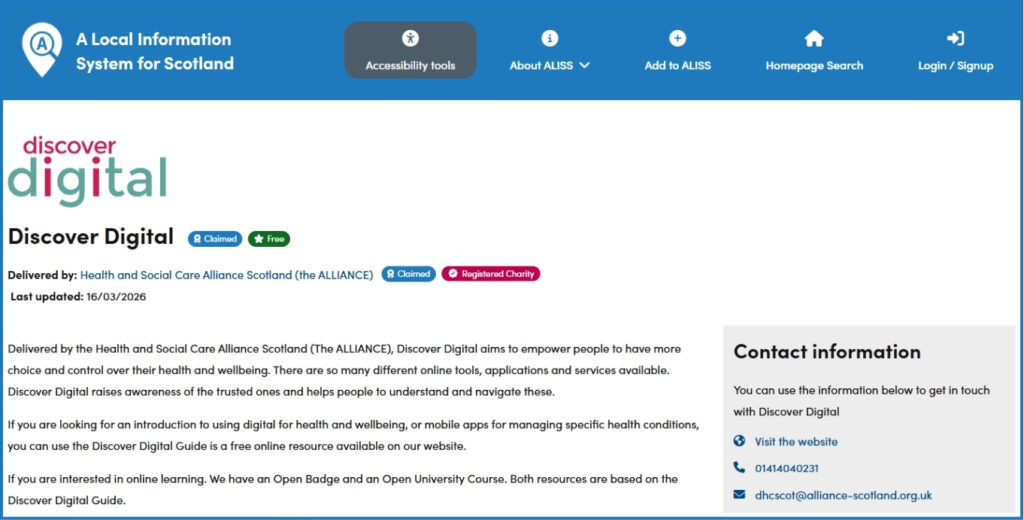
A new ‘Free Service’ badge has been added to listings of services that are free to use. This way, users can quickly see which services are available at no cost. By making this more visible, we hope it will be easier for people to find support they can access without worrying about fees.
Organisations can now also add their OSCR charity number to their ALISS listing. When a valid charity number is added, a charity badge will appear next to the organisation name. In addition, the charity number will link directly to the organisation’s record on the OSCR website. Providing this information can give users a greater sense of trust, because it shows that your organisation is officially registered and regulated.
Service results map view
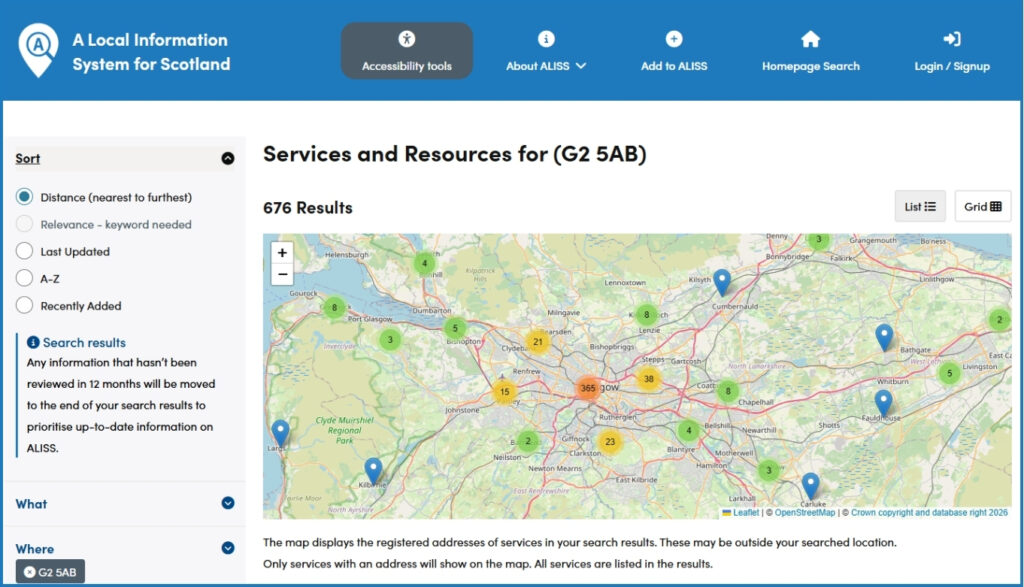
We have also introduced a new map view on the search results page to give users another a way to explore what support is available nearby. Instead of only browsing through a list, people can now see services with a physical address on a map. We hope that this will help people to quickly identify which support options are closest and easy to reach.
Do you manage a listing on ALISS?
Now is a great time to review and update your information. Is your service free to use, but you cannot see the green badge? Log into your account, go to your service page and click ‘Update Service’. Scroll down to ‘Accessibility’, click ‘Edit Information’ and select the ‘Free to use service’ box. Once you have saved your changes, the green badge will appear next to your service name.
To add your charity number, log into your account, go to your organisation page and click ‘Update Organisation’. Provide your charity number, for example SC037475. Once you have saved your changes, the pink charity badge will appear next to your organisation name.
If you have any questions or feedback for the ALISS team, please get in touch at hello@aliss.org.
End of page.
You may also like:
This toolkit helps people work together to find, collect and share information about local resources that support community wellbeing.
Continue readingThe latest development work on ALISS focused on improving the homepage and search results, making the website easier to use on all devices.
Continue readingThe strategy sets out how ALISS aims to achieve continued growth and build on the strengths of its data to deliver value across Scotland.
Continue readingA toolkit that empowers young people to take charge of their health and wellbeing and voice their views on what matters to them.
Continue readingComplete the annual survey to help improve ALISS.
Continue readingALISS has undergone some changes to improve accessibility and user experience. And, you can now subscribe to the ALISS newsletter too!
Continue readingThe ALISS team is delighted to announce the launch of ALISS Analytics, a new tool designed to provide easy access to valuable data on ALISS.
Continue readingThe ALISS programme has continued to grow and develop over 2024.
Continue readingDigiKnowVember is a week long programme of various digital events and activities accross Renfrewshire between the 4th - 8th November.
Continue readingThe ALLIANCE’s ALISS programme announced a new product roadmap, outlining plans for the coming three years.
Continue readingThe ALISS team have introduced more ways to claim and manage information on the ALISS system.
Continue readingThe ALLIANCE is pleased to announce a beta test of an artificial intelligence co-pilot – ConnectingYouNow - on ALISS.
Continue readingALISS launch a new form for contributors to add services and resources to the system.
Continue readingALISS has continued to increase the availability and accessibility of information about community assets, services and resources.
Continue reading